
Whalemate changelog
Changelog
The latest Whalemate releases and improvements.
By continuing, you agree to our T&C and Privacy Policy.
🐋 Whale Product Updates · 15.10.2026
🚀 New features
🎓 Awareness - Academy
🏠 New home screen in the Academy
When you enter the Academy, you first see the activities you left unfinished and your progress by type: paths, courses and games.
⭐ Ratings from your employees on each course and path
In the detail of a course or learning path there is a new tab, "Ratings", with the average, the distribution by stars and the list of ratings.
💬 View and delete an employee's rating from Enrollments
In the "..." menu of each course enrollment you can see the employee's rating and comment, and delete them if you need to.
📊 Insights
🏢 Compare your company with others of your same size in the Benchmark
Besides the industry filter, you can now choose the size: Small, Medium or Large.
🛡️ Threats
💬 Customize the "email already reported" message
In Settings → Report button you can edit the message shown to someone who reports the same simulation email twice, and go back to the default text whenever you want.
✨ Improvements
🛡️ Threats
ℹ️ The report button in Outlook shows a notice instead of an error
If an employee reports the same campaign email twice, they now see an informational notice instead of an error.
🧹 The incident inbox no longer shows "Clean"
When the automatic link analysis finds nothing, the "Clean" label no longer appears. The result is only shown if it is suspicious or a threat, if it is in progress, or if it failed.
🎓 Awareness - Academy
📥 Download the certificate batch from the screen
When the batch is ready, the notice includes a "Download" button to get the PDF without waiting for the email. Available in Courses and in Learning Paths.
ℹ️ The Academy Analytics cards explain what they count
Each status card has an ⓘ icon that explains what each category counts, in Spanish, English and Portuguese.
📊 Insights
⚡ Faster lists for companies with many employees
The newsletter detail and the explorer resource detail load by pages, and in the newsletter you can search and filter by event type. The percentages in the newsletter detail are now calculated over the recipients it was sent to. The employee export is prepared on the server and the button shows that it is downloading.
📄 The exported Simulations report shows the filtered period
The cover and the file name show the period you filtered, instead of the current month.
🔁 The "Repeat offenders" number is calculated the same way on all screens
A person counts as a repeat offender if they fell for a campaign and had already fallen for another before, on any channel. Clicks in test campaigns no longer count. In Campaign Impact the number may go up, because the whole history is now checked even if the earlier fall is outside the period.
🎯 A person's Risk Score is calculated the same way everywhere
It is the same in their profile record, in their profile card and in the company, group and department aggregates. Automatic clicks, test events and events after the campaign closed no longer count, so some people's score may go up or down.
🚀 Campaigns
🌐 The recommendation page is preloaded in your company's language
In email campaigns, the default recommendation page is chosen by the company's language and not the campaign's. The dropdown also offers the generic pages of that language along with your own.
📱 "Valid phone number" in Smishing requires a country code
The switch and the counters for reachable and excluded count a phone as valid only if it has a country code; before, having any digit was enough.
🎨 Platform - UX
🖼️ The company logo accepts only PNG, JPG or WEBP images up to 2 MB
SVG files and files that are not images are rejected.
🐛 Fixes
🛡️ Threats
📬 The report button works for deactivated employees
People who keep an email in their inbox can now report it in Gmail and Outlook, instead of seeing "Add-in error".
📧 The Gmail add-in opens emails without "Add-in error"
We fixed the error that appeared when opening some emails because of the length of the configuration.
🗂️ A new report no longer falls outside the first page of Incidents
The inbox now sorts reports with the same order in a stable way (newest first), and they are not repeated when changing pages.
🚀 Campaigns
➕ Clicks from emails with "+" are now recorded
Employees with a "+" in their email (for example [email protected]) showed up as if they had not clicked in an email campaign; they are now recorded in the report.
🎓 Awareness - Academy
👥 The Academy Admin role can choose employees in the multiple course assignment
Before, it could not choose them. The multiple path assignment is fixed in an upcoming release.
⬆️ The new lesson is shown from the start
When moving between lessons with "Next" or "Previous" on a computer, the content is no longer scrolled down.
⏭️ "Next" in an unfinished reading no longer skips the video that follows
🏆 A trivia ranking counts only those who played
It shows the total number of players next to your position and no longer leaves empty places on the podium.
🌐 The Custom Courses header is shown in the interface language
🎨 Platform - UX
📋 The payroll import no longer fails with the "Instructions" sheet
Now only the first sheet of the file is read. Also, preview errors are shown in the language of your panel.
🐋 Whale product updates · 01.10.2026
🚀 New features
🎓 Awareness - Academy
🧭 Preview screen before starting a course
When you enter a course you haven't started yet or that you already completed, you see a preview screen with the title, the description, the table of contents of sections and, when the course has it, the estimated duration, the language, the last update and the average rating. If you already started it, you go straight in to pick up where you left off.
⭐ Choose whether your employees see the average rating
In Settings › General there's a new toggle, "Show the average to employees". It comes off in every company: until you turn it on, your employees don't see the average. Turning it off only changes what they see: surveys keep being collected and you keep seeing the results. Remember to click "Save" to apply the change.
🔁 Extend and reassign learning paths from Enrollments
In Enrollments, the "..." menu on each learning path row now has two actions, just like the course rows: "Extend due date", which moves the due date without creating another enrollment, and "Reassign", which creates a new enrollment from one that's completed or overdue.
🗂️ Course detail with banner and tabs
The course detail in the admin panel now shows a banner with the cover, the title, the language and the description, and two tabs: "General", with the course content just like before, and "Surveys", which only appears on courses that can collect surveys and is empty for now. The edit pencil only appears on courses that belong to your company. If you had saved the previous link to a course's content, it still works.
📚 New course: Segurança de Redes
The course "Segurança de Redes" is added to the Academy catalog. It's available in Portuguese.
🎨 Platform - UX
📱 Deliverability indicator in SMS campaigns
In step 3 of the SMS campaign wizard, below the chosen message, you now see a deliverability indicator (high, medium or low) that warns you, before launching the campaign, if the content has a pattern that some phone carriers tend to block or filter. It's indicative: it doesn't block sending.
✨ Improvements
🎓 Awareness - Academy
📄 My Learnings is sorted by what you're doing and paginated
Courses, paths and games now show first what you have in progress (including what's about to expire), then the rest by due date and at the end what's overdue or already completed.
🔄 Updated course: Segurança de Aplicações (AppSec)
We updated the content of the course "Segurança de Aplicações (AppSec)". It's available in Portuguese.
🚀 Campaigns
✉️ The employee selector shows each person's email
When building an Email or SMS campaign, in "Select audience" → "Employees" tab, you see each person's email next to their name and you can search by email, as well as by name or department. It's useful for telling apart people with the same first and last name.
📊 Insights
ℹ️ Simulation Analytics cards explain what they count
Each card has an ⓘ icon next to the title: click it to see what it counts. Also, the category "Needs Attention" is now called "First Fall" (in Portuguese "Primeira Queda"), also in the distribution chart and in the exported PDF.
🛡️ Threats
🏷️ Classify a reported email from its detail
When you open the detail of a reported email (Threats (SIEM) → Incidents), click the category tag, next to the subject, and choose Threat, Spam, Clean or Unknown, without going back to the list. The status (Received, Under Review, Resolved) is still only changed from "Reply to user".
🎨 Platform - UX
☎️ Phone numbers have to include the country code
When importing payroll (People & Groups → Import from → Template), when creating or editing a person and through the integration API, the phone number has to carry the country code, with "+" or with "00". If it's missing, the row is marked as an error in the preview and you can't confirm the import until you fix it. Numbers with spaces, hyphens or the "00" prefix are still accepted.
🐛 Fixes
📊 Insights
🔁 The repeat offender count in Employee Analysis no longer counts clicks that aren't a fall
We fixed the "Repeat Offenders" count: it now requires the same event as the rest of the platform according to the campaign type. A click without credential submission in a Credential Harvesting campaign no longer counts as a fall, so the number drops for some people.
🚀 Campaigns
📝 Editing a template no longer loses the selection
In the email campaign wizard, editing a template without leaving the screen no longer deselects the template in the "Email template" step.
🧱 The table buttons in the template editor work again
Deleting and adding rows or columns in the template editor stopped working and showed an error. They now work on the campaigns, newsletters and refresher templates screens.
🎓 Awareness - Academy
👥 The Academy Admin role can now assign a course to a group
Before, the group dropdown appeared empty and, on confirming, it ended in an error. Now you can choose the group and confirm the assignment..
🎨 Platform - UX
🔑 Canceling sign in with Microsoft or Google no longer leaves an error screen
If you cancel on the provider's screen, you now go straight back to the corresponding sign in screen, instead of being left on a blank error response.
🐋 Whale Product Updates · 24.09.2026
🚀 New features
🎓 Awareness - Academy
🔗 Share your certificate on LinkedIn
From Profile → Certificates, if your company has it enabled, you can now publish the certificate of a completed course or learning path directly on LinkedIn. An editable preview opens with suggested text; on confirming, LinkedIn opens with the certificate already loaded as an image.
📜 Learning Path certificate
Just like with courses, you can now download the certificate of a completed learning path from its card in My Learnings.
🧭 The learning path journey shows progress per course
Each course within a learning path now indicates whether you have already completed it, are currently taking it, or haven't started it yet. When you finish a course within the path, you'll see a congratulations message.
🎨 Platform - UX
🔢 Contracted license limit
Companies with a configured license quota now see how many are in use ("180 of 200") in People & Groups → Employees, and cannot add collaborators above the quota, whether manually, by file, or by automatic sync.
✨ Improvements
🎓 Awareness - Academy
🏆 The achievements grid in Profile now shows all of them, including pending ones
Before, you only saw the achievements you had in progress. Now you see all four achievements in the catalog, including the ones you haven't reached yet, each with its real progress.
🎨 The course exported in SCORM format changes design
The SCORM package generated for your LMS now uses Whalemate's palette and typography, with navigation between sections in a bottom bar.
📊 Insights
📐 The Benchmark shows the difference against your industry in the correct unit
The Cyber Risk Score is no longer shown with the "%" symbol, it's a score, not a percentage. Rates (click, report, completion) keep the "%" and their difference is now expressed in percentage points ("pp").
🚀 Campaigns
✉️ Each template in a campaign uses its own sending domain
In a campaign with several templates, each recipient now receives the email from the domain configured for the template they were assigned, instead of the campaign's single domain.
🐛 Fixes
🎓 Awareness - Academy
📩 The trivia no longer resends the mail to those who already completed it
We fixed an issue where a collaborator who had already completed a trivia could receive the enrollment mail again if reassigned before their previous enrollment expired.
🏷️ A trivia's ranking no longer titles the position column "Rol"
We fixed the header of the first column of a trivia's ranking: it now says "Posición".
🎨 Platform - UX
🔑 Clear message when a collaborator account logs in through the admin panel
If you log in to the admin panel with an account that is actually a collaborator's, you now see a clear message indicating where to log in (or you go straight into the Academy, when this can be resolved), instead of a generic error screen.
🐋 Whale Product Updates · 17.09.2026
🚀 New features
🎓 Awareness - Academy
🔍 New status filter in My Learning
In Courses and in Learning Paths, the status filter becomes a secondary control with four buttons: Pending, Due soon, Completed and Overdue. There's no longer an "Assigned" button — with no filter active, you see all your content. A course that's due soon counts in both Pending and Due soon at the same time.
✨ Improvements
🎓 Awareness - Academy
📜 Select all and download certificates with no page limit
In the audit logs for Courses and Learning Paths, "Select all" now marks everything left by the applied filter, not just the visible page. Before downloading we show you how many certificates you're going to generate, and the download is prepared on the server: it arrives by link or by email, with no need to keep the tab open.
🎨 Platform - UX
🔗 "Import from" now takes you to Settings → Integrations
In People & Groups, choosing Azure AD, G Suite or Okta from "Import from" no longer triggers the import or the direct login: it takes you to Settings → Integrations. If your company doesn't have an integration enabled, that option appears disabled. "Template" stays the same.
📊 Insights
✉️ Filter the audit log by several emails at once
In the audit log for Learning Paths and Courses there's a new filter, Email, alongside Department, Country and Group. You can paste up to 200 emails, separated by comma, semicolon or one per line.
🛡️ Threats
📱 The link in SMS simulations is now direct
The SMS in a smishing simulation no longer goes through an intermediate link: it goes straight to the page, avoiding it landing in spam on some Android devices. The click is still tracked the same way, confirmed from the page itself.
🐛 Fixes
🎓 Awareness - Academy
🖼️ The expiration email now shows your company's logo
We fixed the expiration email for a course or a learning path arriving with the Whalemate logo instead of your company's logo.
📚 A deleted course no longer appears in your learning path
We fixed a course deleted from the platform still appearing in the collaborator's learning path detail. Progress already recorded is not lost.
✅ An exam's result is now consistent between the platform and the API
We fixed an issue where, for companies checking exam results through our API, an exam could be returned as passed when the collaborator saw it in the platform as not passed.
📅 Enrollments in courses and paths no longer accept past dates
We fixed being able to assign a course or a learning path with a start or due date earlier than today.
📄 The HTML resource no longer downloads blank
We fixed downloading an HTML type resource from Resources generating an empty file.
🛡️ Threats
🚫 The report button message no longer says the email was deleted
We fixed the default text of "Message when moving the email" in Settings → Report Button: it no longer says the email was deleted, but that it was moved to Junk Mail. This only affects companies that never customized that text.
🚀 Campaigns
🔗 A Campaign Template's email template no longer gets lost when saving
We fixed the email template selector sometimes appearing empty or switching to another template with the same name when saving.
📊 Insights
🕵️ A person's event history no longer fails if the campaign was deleted
We fixed an error in a person's event history when one of those events belonged to a campaign already deleted from the platform. This affects companies that query through our integration API.
🐋 Whale Product Updates · 10.09.2026
🚀 New features
🎓 Awareness - Academy
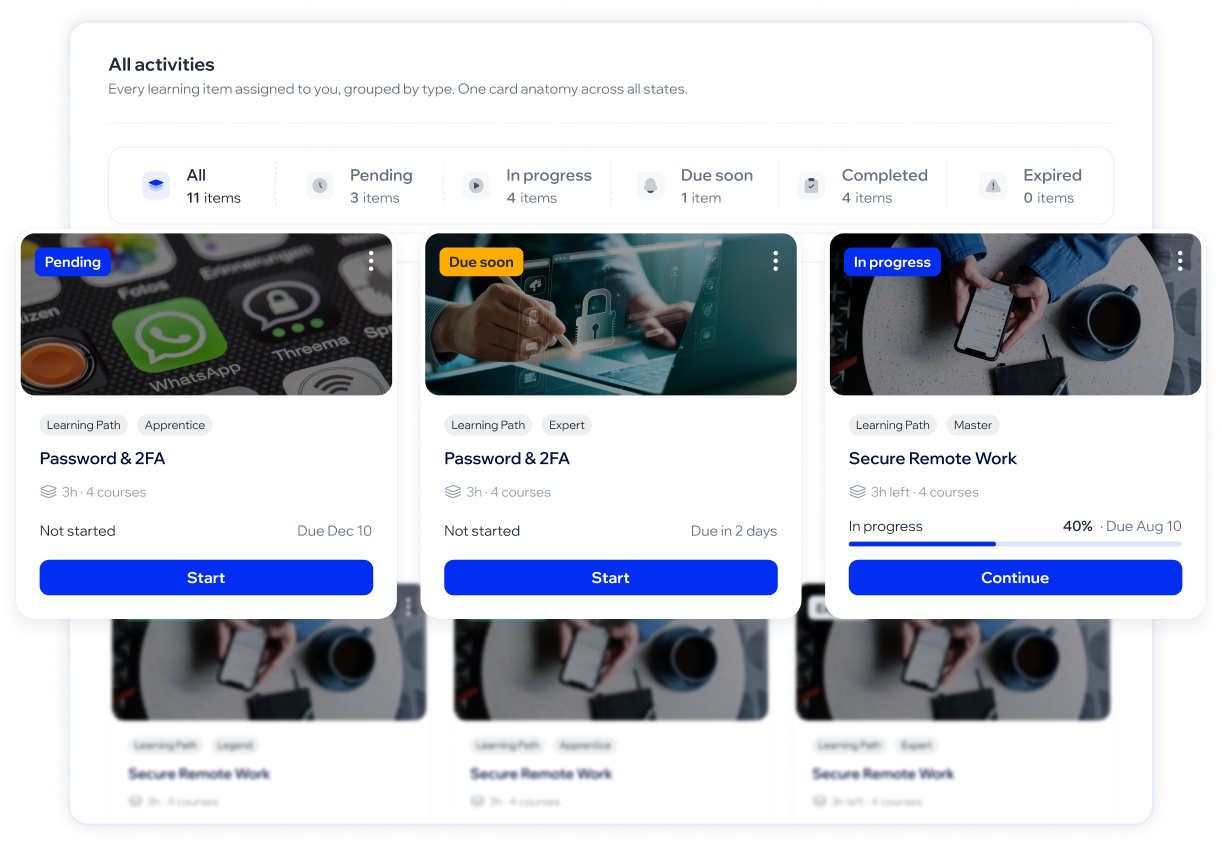
🧭 My Learnings is reorganized into sections, with a button that tells you where you are
Until now, My Learnings was a single screen with everything mixed together. Now you have a side menu with Learning Paths, Courses, Games and Quick checks, each with its own list. Also, each course or path card shows a button that changes depending on your progress: "Start" if you haven't started it yet, "Continue" if you left it halfway, and "Watch again" if you already completed it.
🚀 Campaigns
🎲 Random distribution among a campaign's templates
When you set up a campaign with 2 or more simulation templates, now you can choose to distribute them randomly among people instead of by group. Useful especially if your company doesn't have groups set up: before, without groups, everyone received the same template.
This feature is being rolled out gradually, starting with a small group of accounts. If you don't see it yet in the campaign wizard, it's because your company doesn't have it enabled yet.
✨ Improvements
🎨 Platform - UX
♿ Accessibility improvements on several panel screens
We fixed images without descriptions for screen readers, headings that showed up empty, and some tables that could only be used with a mouse. Now they can also be navigated with a keyboard.
🐛 Fixes
🎓 Awareness - Academy
📊 A Learning Path's progress is now consistent between screens
The percentage you see in a learning path summary is now calculated the same way as in the admin panel (completed courses over the total). When entering a course that's part of a path, the progress card says "Progress in this course" to make it clear that this number is just for that course. It can be different from the path summary, and that's expected.
🔁 A course you already did doesn't block you if it appears again in a path
If you had already completed a course on your own and were later assigned a learning path that includes it, before you had to redo it, and if it was the first one in the path, you were blocked without being able to move forward. Now it's recognized as done.
📅 Enrollments in an expired trivia now show as expired
When a trivia passed its deadline, enrollments still appeared as pending in the ranking instead of expired. They're now counted and shown separately.
🎥 A video in an Academy section no longer freezes
A video in a section (new version of the player) could get stuck forever after a brief connection drop or when coming back from another tab. The mechanism that prevents skipping ahead in the video would trigger on its own, in a loop. Now playback recovers on its own, without affecting that protection.
🎨 Platform - UX
🔐 The Okta info button is enabled when creating the SCIM token
When creating the Okta SCIM token, the button to view its information was disabled by mistake. Now it's enabled as it should be.
🔑 A double click on "Sign in" no longer counts as two attempts
The sign in button is disabled while the attempt is being processed, so a double click from slowness doesn't use up quota from the attempt limit.
🐋 Whale Product Updates · 03.09.2026
🚀 New features
🛡️ Threats
🎯 Multiple templates in the same phishing simulation
Now you can choose between 2 and 5 templates for an email simulation and the platform assigns each one to a different group of your audience. Before launching you see which template goes to each group and how many people, in the order you chose them. The results in the campaign detail (sent, fell for it, reported) are shown separated by template. Those who don't belong to any group also receive a template, so no one is left without a simulation.
This feature is being enabled gradually, starting with a small group of accounts. If you still don't see it in the campaign wizard, it's because your company doesn't have it activated yet.
🎓 Awareness - Academy
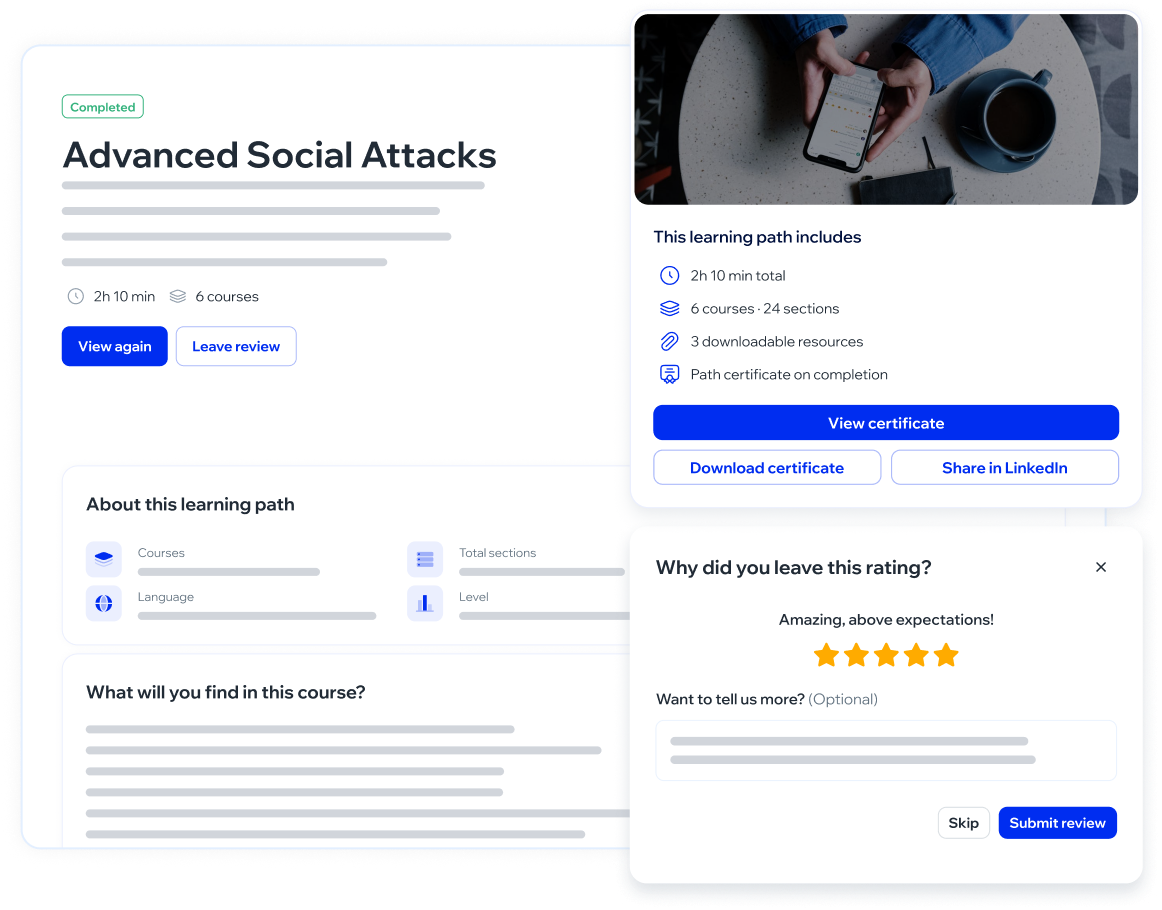
🧭 New presentation screen for each Learning Path
When you enter a Learning Path from your activity, you now see a preview screen with its title, description, number of courses and sections, and the level, before starting it. If you already started it, you see your progress and the button to continue where you left off.
🔒 Locked courses within a Learning Path explain why
A course that hasn't been unlocked yet appears dimmed with the reason ("Complete the previous course to unlock it" or "No content yet"), instead of showing without explanation. A course you already completed remains available to review again, even if the Learning Path has expired.
⚡ Quick course assignment from the grid
From the menu of each of your own courses in Cursos Personalizados you can now assign it directly to a person, a group, a department, or the whole company, without going through the 3 step wizard.
⭐ Control whether your company collects satisfaction surveys
In your company's settings you can decide whether you want to collect satisfaction surveys when one of your own courses is completed.
Whalemate catalog content always keeps collecting surveys, regardless of this setting.
✨ Improvements
🎓 Awareness - Academy
🗑️ Deleting a course now explains why it can't be done
If you try to delete one of your own courses that has people enrolled, the window no longer hangs without a response: it tells you how many people are taking it and the course stays intact.
🎨 Redesigned certificates with your company's identity
We redesigned the Academy certificates so they look clearer and neater. Also, certificates for the courses your company uploads now come out with your brand color (band, icons, and name) and without the Whalemate seal. Certificates for catalog courses keep the Whalemate identity.
🐛 Fixes
🎨 Platform - UX
💬 Two confirmation messages in a row now both show
When one action succeeded and another failed almost at the same time, the second message wasn't shown. Now both are shown.
🌐 Translated error message when connecting email
When choosing Microsoft or Google as the email provider without having connected that account, the error message no longer shows the internal technical detail and now explains the situation in Spanish.
🚀 Campaigns
📧 A newsletter with a misconfigured sender is no longer marked as created
If the Microsoft or Google email sender is misconfigured, creating a newsletter now warns you instantly instead of marking it as sent and failing hours later without anyone noticing.
🐋 Whale Product Updates · 27.08.2026
🚀 New features
🎓 Awareness - Academy
📖 We redesigned the course screen
The table of contents moved to the right, with the type and duration of each lesson, and now you can move forward and back between lessons —before you could only move forward—. The text reads straight through, with no double scroll, and the screen colors follow your company's brand. If you prefer the previous screen, you can go back to it with one click from the same course, without losing your progress. In quizzes, you now also confirm each answer before moving to the next one and the correct one is marked in green.
🚀 Campaigns
📅 Cutoff date for your email campaigns
Email phishing campaigns can now have a cutoff date, configurable when setting up the campaign or from the detail view of one already sent. Past that point the report stops moving: late interaction gets recorded but doesn't count, doesn't assign a course, and doesn't trigger a webhook notice. Correcting or removing the date recalculates the numbers.
Doesn't apply to SMS or QR.
🛡️ Threats
🔁 Restore the report button messages
You can now revert any report button message to the platform's default text, one by one and without going through support. The restored message follows your company's language.
✨ Improvements
🎓 Awareness - Academy
✅ Select all enrollments in the filter
When extending the due date of enrollments to a course, you can now select all those matching the applied filter at once, not just the ones on the page you're viewing.
🐛 Fixes
🚀 Campaigns
📝 A simulation draft can now be resumed
Email simulations left half done now show up in the Launch Calendar with the "Draft" tag and can be resumed from the row's menu.
📊 Insights
📊 Newsletter analytics no longer count what's still on its way
The detail view of a newsletter no longer counts emails still in the queue as sent.
🐋 Whale Product Updates · 08.20.2026
🚀 New features
🎨 Platform - UX
🔍 New access type: Auditor
Now you can give someone read-only access to the entire platform. A user with Auditor access sees everything —campaigns, courses, statistics, settings— and can't modify anything: creation buttons don't appear and actions are disabled with the notice "Your access is read-only, so you can't make this change.". It's assigned from Settings → Users, in the Access type dropdown, and the Access column in the table shows you who has it.
Access is read-only for the entire platform: it can't be limited by section. The only thing an Auditor can do is change their own password and set up their second factor. Exporting and downloading still work: taking the information with you is part of the role.
🎓 Awareness - Academy
🧭 The Agent now starts with a plan overview
When you have an active plan, Awareness → Agent no longer takes you straight to the schedule: it opens with an overview showing overall plan progress, the objectives it covers, how much of each activity type you've completed, and what's coming up next. If there's no plan yet, the screen guides you through creating one.
This only appears for companies that already have an active Agent plan.
📙 New course: Secure Development, now also in Portuguese
The Portuguese version of Secure Development is now in the catalog, titled "Desenvolvimento Seguro". If you have teams that work in Portuguese, you can assign them this version instead of the Spanish or English one. You assign it like any other course, from Academy → Courses.
✨ Improvements
🎓 Awareness - Academy
⚡ Course enrollments now open in large companies
In Academy → Courses → the course → Enrollments, the table now loads rows by page instead of downloading them all at once. In courses with a lot of enrolled people, that was the difference between the screen loading and not loading at all. What changes for you: the total at the bottom of the table is the actual course total and not the number of loaded rows; the search box and the Status, Department, Group, and Date range filters search across all enrollments in the course, so if you're looking for someone on page 8, you'll find them starting from page 1; sorting by Employee is preserved when you change pages; CSV and PDF exports download everything that matches the current filters; and if you turn on row selection and switch pages, what you've already checked stays checked.
The Date range filter now filters by the enrollment's start date. Before, it filtered by the due date, so the same range may give you a different result than before.
📨 The complete enrollment history now arrives by email
The Export complete history (XLSX) option no longer makes you wait with a frozen screen. Now you request it, the platform lets you know it's being prepared, and the file arrives by email with a download link that lasts 48 hours.
This is the complete history export, the one that includes all enrollments without a date filter. The CSV and PDF exports of what you're currently viewing on screen haven't changed: they still download instantly.
📅 Bulk due date extension is back
In Academy → Courses → the course → Enrollments you can once again extend the due date for several people at once. There's a Select rows icon in the upper right: clicking it shows a checkbox on each row, you check the ones you want, and on the bar that appears above the table you click Extend due date. You can build the batch across several pages: what you've checked isn't lost when you change pages, search, or filter.
Only Pending or Overdue enrollments can be selected; a Completed one has already met its goal, so its checkbox is disabled. Extending a batch updates existing enrollments: it doesn't create new enrollments or leave duplicates. The one-by-one action, from each row's three-dot menu, hasn't changed.
🐛 Fixes
🛡️ Threats
🔗 Links in a reported email are now analyzed clean
Links in a reported email arrived with the email add-on's markup stuck to the address, so the reputation service query was run against an address that wasn't the real one. Now they're cleaned before being queried and before being saved, and the verdict you see in Inbox → the email → Domain & URLs corresponds to the actual address. Links from which an address can't be recovered are still shown in the list.
This applies to reported emails from now on: reports that already existed keep the address as it was originally saved. And cleaning the address doesn't change the verdict itself — a domain registered yesterday can still come back as "Clean".
🏷️ "Delete when reporting" is now called "Junk when reporting"
The option said the email would be deleted, but what it actually does is move it to the junk mail folder. In Settings → Report Button the option has been renamed and now includes a note explaining exactly what it does.
This is a name change: the report button's behavior hasn't changed. Moving to junk mail works on Microsoft accounts (Outlook / Microsoft 365).
📊 Insights
🗂️ Exporting a very long dashboard to PDF no longer fails
Exporting the dashboard for a company with many departments used to cut off the download. Now the file is generated properly.
🎨 Platform - UX
🇧🇷 The roster template now accepts Portuguese
The template you download from Collaborators → Import → Load manually offered a language code that the import would later reject, so rows in Portuguese wouldn't go through. This has now been fixed in the template.
If you have a template downloaded from before, download it again: the old one still has the code that doesn't work.
🧩 The smart group preview no longer repeats people
The smart group preview used to show the same person multiple times, and the counter showed the sample size instead of how many people the group actually reaches. Both issues are fixed.
The group's membership was never wrong: what was failing was what the preview displayed.