
Whalemate changelog
Historial de cambios
Las últimas versiones y mejoras de Whalemate.
Al continuar, aceptas nuestros Términos y Política de privacidad.
🐋 Whale Product Updates · 15.10.2026
🚀 Nuevas funcionalidades
🎓 Awareness - Academy
🏠 Nueva pantalla de inicio en la Academia
Al entrar a la Academia ves primero las actividades que dejaste a medias y tu avance por tipo: rutas, cursos y juegos.
⭐ Valoraciones de tus colaboradores en cada curso y ruta
En el detalle de un curso o de una ruta de aprendizaje hay una pestaña nueva, «Valoraciones», con el promedio, la distribución por estrellas y la lista de valoraciones.
💬 Mira y elimina la valoración de un colaborador desde Inscripciones
En el menú «...» de cada inscripción a un curso puedes ver la calificación y el comentario del colaborador, y eliminarlos si lo necesitas.
📊 Insights
🏢 Compara tu empresa con otras de tu mismo tamaño en el Benchmark
Además del filtro por industria, ahora puedes elegir el tamaño: Chica, Mediana o Grande.
🛡️ Threats
💬 Personaliza el mensaje de «correo ya reportado»
En Configuración → Botón de reporte puedes editar el mensaje que ve quien reporta dos veces el mismo correo de una simulación, y volver al texto por defecto cuando quieras.
✨ Mejoras
🛡️ Threats
ℹ️ El botón de reporte en Outlook avisa en vez de mostrar un error
Si un colaborador reporta dos veces el mismo correo de una campaña, ahora ve un aviso informativo en lugar de un error.
🧹 La bandeja de incidentes deja de mostrar «Limpio»
Cuando el análisis automático de links no encuentra nada, ya no aparece la etiqueta «Limpio». Solo se muestra el resultado si es sospechoso o amenaza, si está en curso o si falló.
🎓 Awareness - Academy
📥 Descarga la tanda de certificados desde la pantalla
Cuando la tanda está lista, el aviso incluye un botón «Descargar» para bajar el PDF sin esperar el correo. Disponible en Cursos y en Rutas de Aprendizaje.
ℹ️ Las tarjetas de Analíticas de Academia explican qué cuentan
Cada tarjeta de estado tiene un ícono ⓘ que explica qué cuenta cada categoría, en español, inglés y portugués.
📊 Insights
⚡ Listados más rápidos para empresas con muchos empleados
El detalle del newsletter y el de un recurso del explorador cargan por páginas, y en el newsletter puedes buscar y filtrar por tipo de evento. Los porcentajes del detalle del newsletter ahora se calculan sobre los destinatarios a los que se envió. La exportación de colaboradores se prepara en el servidor y el botón muestra que está descargando.
📄 El reporte exportado de Simulaciones muestra el período filtrado
La portada y el nombre del archivo indican el período que filtraste, en lugar del mes actual.
🔁 El número de «Reincidentes» se calcula igual en todas las pantallas
Una persona cuenta como reincidente si cayó en una campaña y ya había caído antes en otra, en cualquier canal. Los clics en campañas de prueba ya no cuentan. En Impacto de Campaña el número puede subir, porque ahora se mira todo el historial aunque la caída anterior quede fuera del período.
🎯 El Risk Score de una persona se calcula igual en todas partes
Es el mismo en su ficha, en su tarjeta del perfil y en los agregados de empresa, grupo y departamento. Ya no cuentan los clics automáticos, los eventos de prueba ni los eventos posteriores al cierre de la campaña, así que el score de algunas personas puede subir o bajar.
🚀 Campaigns
🌐 La página de recomendación se precarga en el idioma de tu empresa
En las campañas de email, la página de recomendación por defecto sale según el idioma de la empresa y no el de la campaña. El desplegable ofrece también las páginas genéricas de ese idioma junto a las propias.
📱 «Número de teléfono válido» en Smishing exige código de país
El interruptor y los contadores de alcanzables y excluidos consideran válido solo un teléfono con código de país; antes bastaba con que tuviera algún dígito.
🎨 Platform - UX
🖼️ El logo de la empresa acepta solo imágenes PNG, JPG o WEBP de hasta 2 MB
Los archivos SVG o que no sean imágenes se rechazan.
🐛 Correcciones
🛡️ Threats
📬 El botón de reporte funciona para colaboradores dados de baja
Quienes conservan un correo en su bandeja ya pueden reportarlo en Gmail y Outlook, en vez de ver «Error de complemento».
📧 El complemento de Gmail abre correos sin «Error de complemento»
Corregimos el error que aparecía al abrir algunos correos por el largo de la configuración.
🗂️ Un reporte nuevo ya no queda fuera de la primera página de Incidentes
La bandeja ordena de forma estable los reportes con el mismo orden (el más nuevo primero), y no se repiten al cambiar de página.
🚀 Campaigns
➕ Los clics de correos con «+» ahora se registran
Los colaboradores con un «+» en su correo (por ejemplo [email protected]) figuraban como si no hubieran hecho clic en una campaña de email; ahora se registran en el informe.
🎓 Awareness - Academy
👥 El rol Academy Admin puede elegir colaboradores en la asignación múltiple de cursos
Antes no podía elegirlos. La asignación múltiple de rutas se corrige en un próximo release.
⬆️ La lección nueva se muestra desde el principio
Al pasar de lección con «Siguiente» o «Anterior» desde una computadora, el contenido ya no queda desplazado hacia abajo.
⏭️ «Siguiente» en una lectura sin completar ya no saltea el video que sigue
🏆 El ranking de una trivia cuenta solo a quienes jugaron
Muestra el total de jugadores junto a tu posición y ya no deja lugares vacíos en el podio.
🌐 El encabezado de Cursos Personalizados se muestra en el idioma de la interfaz
🎨 Platform - UX
📋 La importación de nómina ya no falla con la hoja «Instrucciones»
Ahora se lee solo la primera hoja del archivo. Además, los errores de la vista previa se muestran en el idioma de tu panel.
🐋 Whale Product Updates · 01.10.2026
🚀 Nuevas funcionalidades
🎓 Awareness - Academy
🧭 Pantalla de presentación antes de empezar un curso
Al entrar a un curso que todavía no empezaste o que ya completaste, ves una pantalla previa con el título, la descripción, el índice de secciones y, cuando el curso lo tiene, la duración estimada, el idioma, la última actualización y el promedio de valoraciones. Si ya lo empezaste, entras directo para retomarlo donde quedaste.
⭐ Elige si tus colaboradores ven el promedio de valoraciones
En Configuración › General hay un interruptor nuevo, «Mostrar el promedio a los colaboradores». Viene apagado en todas las empresas: hasta que lo enciendas, tus colaboradores no ven el promedio. Apagarlo solo cambia lo que ven ellos: las encuestas se siguen recolectando y tú sigues viendo los resultados. Recuerda hacer clic en «Guardar» para aplicar el cambio.
🔁 Extender y reasignar rutas de aprendizaje desde Inscripciones
En Inscripciones, el menú «...» de cada fila de ruta de aprendizaje ahora tiene dos acciones, igual que las filas de cursos: «Extender fecha de vencimiento», que mueve el vencimiento sin crear otra inscripción, y «Reasignar», que crea una inscripción nueva a partir de una completada o vencida.
🗂️ Detalle de un curso con banner y pestañas
El detalle de un curso en el panel de administración ahora muestra un banner con la portada, el título, el idioma y la descripción, y dos pestañas: «General», con el contenido del curso igual que antes, y «Encuestas», que aparece solo en los cursos que pueden recoger encuestas y por ahora está vacía. El lápiz para editar aparece solo en los cursos propios de tu empresa. Si habías guardado el link anterior del contenido de un curso, sigue funcionando.
📚 Nuevo curso: Segurança de Redes
Se suma al catálogo de la Academia el curso «Segurança de Redes». Está disponible en portugués.
🎨 Platform - UX
📱 Indicador de entregabilidad en las campañas de SMS
En el paso 3 del asistente de campañas de SMS, debajo del mensaje elegido, ahora ves un indicador de entregabilidad (alta, media o baja) que te avisa, antes de lanzar la campaña, si el contenido tiene un patrón que algunos operadores de telefonía suelen bloquear o filtrar. Es orientativo: no bloquea el envío.
✨ Mejoras
🎓 Awareness - Academy
📄 Mis Aprendizajes se ordena por lo que estás haciendo y se recorre por páginas
Cursos, rutas y juegos ahora muestran primero lo que tienes en progreso (incluido lo que está por vencer), después el resto por fecha de vencimiento y al final lo vencido o ya completado.
🔄 Curso actualizado: Segurança de Aplicações (AppSec)
Actualizamos el contenido del curso «Segurança de Aplicações (AppSec)». Está disponible en portugués.
🚀 Campaigns
✉️ El selector de empleados muestra el correo de cada persona
Al armar una campaña por Email o por SMS, en «Seleccionar audiencia» → pestaña «Empleados», ves el correo de cada persona junto a su nombre y puedes buscar por correo, además de por nombre o departamento. Sirve para distinguir a quienes tienen el mismo nombre y apellido.
📊 Insights
ℹ️ Las tarjetas de Analíticas de Simulaciones explican qué cuentan
Cada tarjeta tiene un ícono ⓘ junto al título: haz clic para ver qué cuenta. Además, la categoría «Necesita Atención» ahora se llama «Primera Caída» (en inglés «First Fall», en portugués «Primeira Queda»), también en el gráfico de distribución y en el PDF exportado.
🛡️ Threats
🏷️ Clasifica un correo reportado desde su detalle
Al abrir el detalle de un correo reportado (Amenazas (SIEM) → Incidentes), haz clic en la etiqueta de categoría, junto al asunto, y elige Amenaza, Spam, Limpio o Desconocido, sin volver a la lista. El estado (Recibido, En Revisión, Resuelto) se sigue cambiando solo desde «Responder al usuario».
🎨 Platform - UX
☎️ Los teléfonos tienen que incluir el código de país
Al importar la nómina (Personas & Grupos → Importar desde → Plantilla), al dar de alta o editar a una persona y por la API de integración, el teléfono tiene que traer el código de país, con «+» o con «00». Si falta, la fila queda marcada como error en la vista previa y no puedes confirmar la importación hasta corregirla. Los números con espacios, guiones o el prefijo «00» se siguen aceptando.
🐛 Correcciones
📊 Insights
🔁 El conteo de reincidentes en Employee Analysis ya no cuenta clics que no son una caída
Corregimos el conteo de «Repeat Offenders»: ahora exige el mismo evento que el resto de la plataforma según el tipo de campaña. Un clic sin entrega de credenciales en una campaña de Credential Harvesting ya no cuenta como caída, así que el número de algunas personas baja.
🚀 Campaigns
📝 Editar una plantilla ya no hace perder la selección
En el asistente de campañas de email, editar una plantilla sin salir de la pantalla ya no deselecciona la plantilla en el paso «Plantilla de email».
🧱 Los botones de tabla del editor de plantillas vuelven a funcionar
Borrar y agregar filas o columnas en el editor de plantillas dejaba de funcionar y mostraba un error. Ya funcionan en las pantallas de campañas, newsletters y refresher templates.
🎓 Awareness - Academy
👥 El rol Academy Admin ya puede asignar un curso a un grupo
Antes el desplegable de grupos aparecía vacío y, al confirmar, terminaba en un error. Ahora puedes elegir el grupo y confirmar la asignación..
🎨 Platform - UX
🔑 Cancelar el ingreso con Microsoft o Google ya no deja una pantalla de error
Si cancelas en la pantalla del proveedor, ahora vuelves directo a la pantalla de ingreso que corresponde, en vez de quedar en una respuesta de error en blanco.
🐋 Whale Product Updates · 24.09.2026
🚀 Nuevas funcionalidades
🎓 Awareness - Academy
🔗 Comparte tu certificado en LinkedIn
Desde Perfil → Certificados, si tu empresa lo tiene habilitado, ahora puedes publicar el certificado de un curso o ruta de aprendizaje completada directamente en LinkedIn. Se abre un preview editable con un texto sugerido; al confirmar, LinkedIn se abre con el certificado ya cargado como imagen.
📜 Certificado de Learning Path
Igual que con los cursos, ahora puedes descargar el certificado de una ruta de aprendizaje completa desde su card en Mis Aprendizajes.
🧭 El recorrido de una ruta de aprendizaje muestra el avance por curso
Cada curso dentro de una ruta de aprendizaje ahora indica si ya lo completaste, si lo estás cursando o si todavía no lo empezaste. Al terminar un curso dentro de la ruta, vas a ver un mensaje de felicitación.
🎨 Platform - UX
🔢 Límite de licencias contratadas
Las empresas con un cupo de licencias configurado ahora ven cuántas tienen en uso ("180 de 200") en Personas & Grupos → Empleados, y no pueden dar de alta colaboradores por encima del cupo, sea a mano, por archivo o por sincronización automática.
✨ Mejoras
🎓 Awareness - Academy
🏆 La grilla de logros del Perfil ahora muestra todos, incluidos los pendientes
Antes solo veías los logros que tenías en progreso. Ahora ves los cuatro logros del catálogo, incluidos los que todavía no alcanzaste, cada uno con su progreso real.
🎨 El curso exportado en formato SCORM cambia de diseño
El paquete SCORM que se genera para tu LMS ahora usa la paleta y tipografía de Whalemate, con la navegación entre secciones en una barra inferior.
📊 Insights
📐 El Benchmark muestra la diferencia contra tu industria en la unidad correcta
El Cyber Risk Score ya no se muestra con el símbolo "%" — es un puntaje, no un porcentaje. Las tasas (clic, reporte, finalización) conservan el "%" y su diferencia ahora se expresa en puntos porcentuales ("pp").
🚀 Campaigns
✉️ Cada plantilla de una campaña usa su propio dominio de envío
En una campaña con varias plantillas, cada destinatario ahora recibe el correo desde el dominio configurado para la plantilla que le tocó, en vez del dominio único de la campaña.
🐛 Correcciones
🎓 Awareness - Academy
📩 La trivia ya no reenvía el mail a quien ya la completó
Corregimos que un colaborador que ya había completado una trivia pudiera volver a recibir el mail de inscripción si se lo reasignaba antes de que venciera su inscripción anterior.
🏷️ El ranking de una trivia ya no titula "Rol" a la columna de posición
Corregimos el encabezado de la primera columna del ranking de una trivia: ahora dice "Posición".
🎨 Platform - UX
🔑 Mensaje claro cuando una cuenta de colaborador entra por el panel de administración
Si entras al panel de administración con una cuenta que en realidad es de colaborador, ahora ves un mensaje claro indicando dónde ingresar (o entras directo a la Academia, cuando se puede resolver), en vez de una pantalla de error genérica.
🐋 Whale Product Updates · 17.09.2026
🚀 Nuevas funcionalidades
🎓 Awareness - Academy
🔍 Nuevo filtro por estado en Mis Aprendizajes
En Cursos y en Rutas de Aprendizaje, el filtro por estado pasa a ser un control secundario de cuatro botones: Pendientes, Por vencer, Finalizados y Vencidos. Ya no hay un botón «Asignados» — sin ningún filtro activo, ves todo tu contenido. Un curso por vencer cuenta en Pendientes y en Por vencer a la vez.
✨ Mejoras
🎓 Awareness - Academy
📜 Seleccionar todo y descargar certificados sin límite de página
En los registros de auditoría de Cursos y de Rutas de Aprendizaje, «Seleccionar todo» ahora marca todo lo que dejó el filtro aplicado, no solo la página visible. Antes de descargar te mostramos cuántos certificados vas a generar, y la descarga se prepara en el servidor: llega por link o por correo, sin mantener la pestaña abierta.
🎨 Platform - UX
🔗 «Importar desde» ahora te lleva a Configuración → Integraciones
En Personas & Grupos, elegir Azure AD, G Suite u Okta desde «Importar desde» ya no dispara la importación ni el login directo: te lleva a Configuración → Integraciones. Si tu empresa no tiene una integración habilitada, esa opción aparece deshabilitada. «Plantilla» sigue igual.
📊 Insights
✉️ Filtra el registro de auditoría por varios correos a la vez
En el registro de auditoría de Rutas de Aprendizaje y de Cursos hay un filtro nuevo, Correo, junto a los de Departamento, País y Grupo. Puedes pegar hasta 200 correos, separados por coma, punto y coma o uno por línea.
🛡️ Threats
📱 El link de las simulaciones por SMS ahora es directo
El SMS de una simulación de smishing ya no pasa por un link intermedio: lleva directo a la página, evitando que caiga en spam en algunos dispositivos Android. El clic se sigue registrando igual, confirmado desde la propia página.
🐛 Correcciones
🎓 Awareness - Academy
🖼️ El correo de vencimiento ya muestra el logo de tu empresa
Corregimos que el correo de vencimiento de un curso o de una ruta de aprendizaje llegara con el logo de Whalemate en vez del logo de tu empresa.
📚 Un curso eliminado ya no aparece en tu ruta de aprendizaje
Corregimos que un curso eliminado de la plataforma siguiera apareciendo en el detalle de la ruta de aprendizaje del colaborador. El progreso ya registrado no se pierde.
✅ El resultado de un examen ya es consistente entre la plataforma y la API
Corregimos que, para empresas que consultan resultados de exámenes a través de nuestra API, un examen pudiera devolverse como aprobado cuando el colaborador lo veía en la plataforma como no aprobado.
📅 Las inscripciones a cursos y rutas ya no aceptan fechas pasadas
Corregimos que se pudiera asignar un curso o una ruta de aprendizaje con fecha de inicio o de vencimiento anterior a hoy.
📄 El recurso HTML ya no se descarga en blanco
Corregimos que descargar un recurso de tipo HTML desde Recursos generara un archivo vacío.
🛡️ Threats
🚫 El mensaje del botón de reporte ya no dice que el correo se eliminó
Corregimos el texto por defecto de «Mensaje al mover el correo» en Configuración → Botón de Reporte: ya no dice que el correo se eliminó, sino que se movió a Correo no deseado. Solo afecta a empresas que nunca personalizaron ese texto.
🚀 Campaigns
🔗 La plantilla de correo de una Campaign Template ya no se pierde al guardar
Corregimos que el selector de plantilla de correo pudiera aparecer vacío o cambiar a otra plantilla con el mismo nombre al guardar.
📊 Insights
🕵️ El historial de eventos de una persona ya no falla si la campaña fue eliminada
Corregimos un error en el historial de eventos de una persona cuando alguno de esos eventos pertenecía a una campaña ya eliminada de la plataforma. Afecta a empresas que consultan por nuestra API de integración.
🐋 Whale Product Updates · 10.09.2026
🚀 Nuevas funcionalidades
🎓 Awareness - Academy
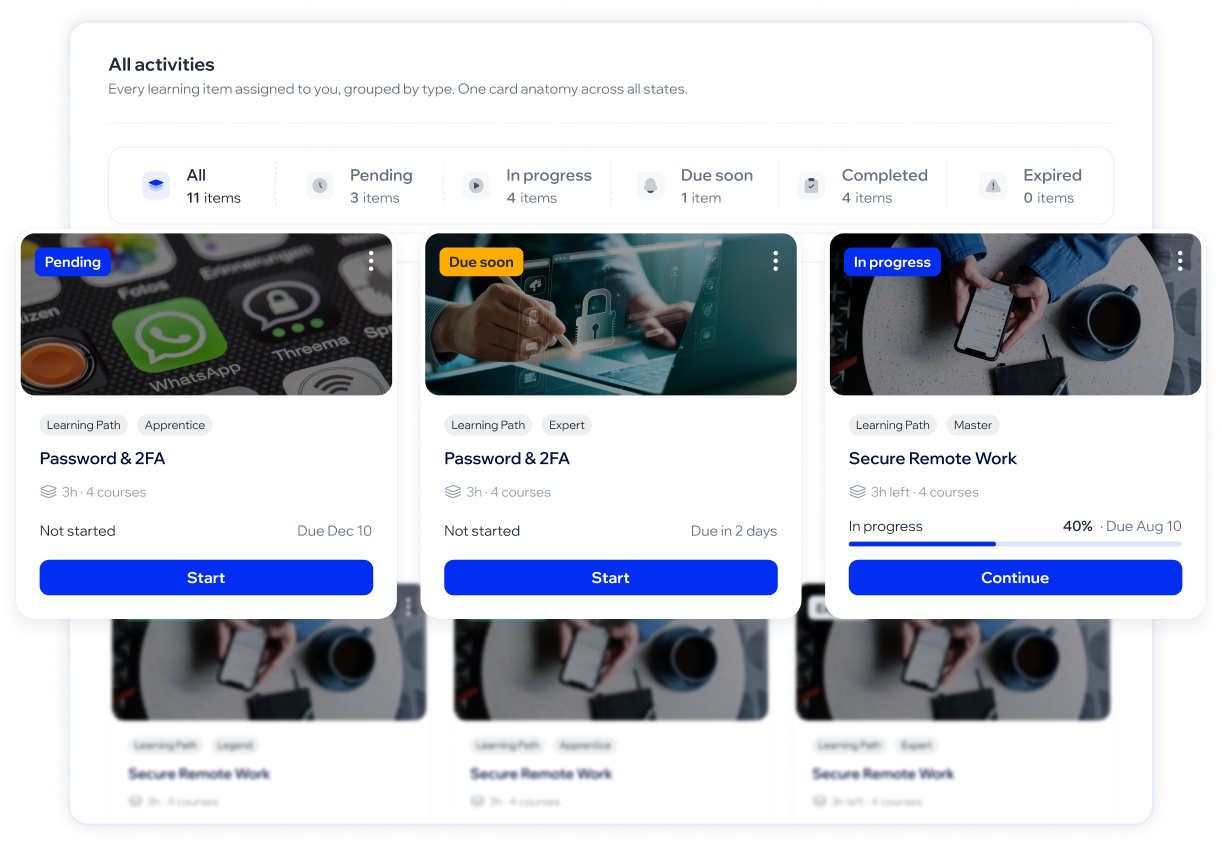
🧭 Mis Aprendizajes se reorganiza en secciones, con un botón que dice dónde estás
Hasta ahora, Mis Aprendizajes era una sola pantalla con todo mezclado. Ahora tienes un menú lateral con Learning Paths, Cursos, Juegos y Chequeos rápidos, cada uno con su propia lista. Además, cada tarjeta de curso o ruta muestra un botón que cambia según tu avance: «Comenzar» si todavía no la empezaste, «Continuar» si la dejaste a la mitad, y «Volver a ver» si ya la completaste.
🚀 Campaigns
🎲 Reparto al azar entre las plantillas de una campaña
Cuando armas una campaña con 2 o más plantillas de simulación, ahora puedes elegir que se repartan al azar entre las personas en vez de por grupo. Útil sobre todo si tu empresa no tiene grupos armados: antes, sin grupos, todos recibían la misma plantilla.
Esta funcionalidad se está habilitando de forma gradual, empezando por un grupo reducido de cuentas — si todavía no la ves en el asistente de campaña, es porque tu empresa aún no la tiene activada.
✨ Mejoras
🎨 Platform - UX
♿ Mejoras de accesibilidad en varias pantallas del panel
Corregimos imágenes sin descripción para lectores de pantalla, encabezados que se mostraban vacíos, y algunas tablas que solo se podían usar con mouse — ahora también se navegan con teclado.
🐛 Correcciones
🎓 Awareness - Academy
📊 El progreso de un Learning Path ahora es consistente entre pantallas
El porcentaje que ves en el resumen de una ruta de aprendizaje ahora se calcula igual que en el panel del administrador (cursos completados sobre el total). Al entrar a un curso que forma parte de una ruta, la tarjeta de progreso dice «Progreso de este curso» para dejar claro que ese número es solo de ese curso — puede ser distinto del resumen de la ruta, y eso es esperado.
🔁 Un curso que ya hiciste no te bloquea si aparece de nuevo en una ruta
Si ya habías completado un curso por tu cuenta y después te asignaron una ruta de aprendizaje que lo incluye, antes tenías que rehacerlo — y si era el primero de la ruta, quedabas bloqueado sin poder avanzar. Ahora se reconoce como hecho.
📅 Las inscripciones a una trivia vencida ya figuran como vencidas
Cuando una trivia pasaba su fecha límite, las inscripciones seguían apareciendo como pendientes en el ranking en vez de vencidas. Ya se cuentan y se muestran por separado.
🎥 Un video de una sección de la Academia ya no se congela
Un video de una sección (versión nueva del reproductor) podía quedar trabado para siempre después de un corte breve de conexión o al volver de otra pestaña — el mecanismo que evita adelantar el video se disparaba solo, en bucle. Ahora la reproducción se recupera sola, sin afectar esa protección.
🎨 Platform - UX
🔐 El botón de info de Okta se habilita al crear el token SCIM
Al crear el token SCIM de Okta, el botón para ver su información quedaba deshabilitado por error. Ahora se habilita como corresponde.
🔑 Un doble clic en «Iniciar sesión» ya no cuenta como dos intentos
El botón de inicio de sesión se deshabilita mientras se procesa el intento, así un clic doble por lentitud no gasta cupo del límite de intentos.
🐋 Whale Product Updates · 03.09.2026
🚀 Nuevas funcionalidades
🛡️ Threats
🎯 Varias plantillas en una misma simulación de phishing
Ahora puedes elegir entre 2 y 5 plantillas para una simulación de email y la plataforma reparte cada una a un grupo distinto de tu audiencia. Antes de lanzar ves qué plantilla le toca a cada grupo y a cuántas personas, en el orden en que las elegiste. Los resultados del detalle de la campaña —enviados, caídas, reportes— se muestran separados por plantilla. Quienes no pertenecen a ningún grupo también reciben una plantilla, así que nadie se queda sin simulación.
Esta funcionalidad se está habilitando de forma gradual, empezando por un grupo reducido de cuentas — si todavía no la ves en el asistente de campaña, es porque tu empresa aún no la tiene activada.
🎓 Awareness - Academy
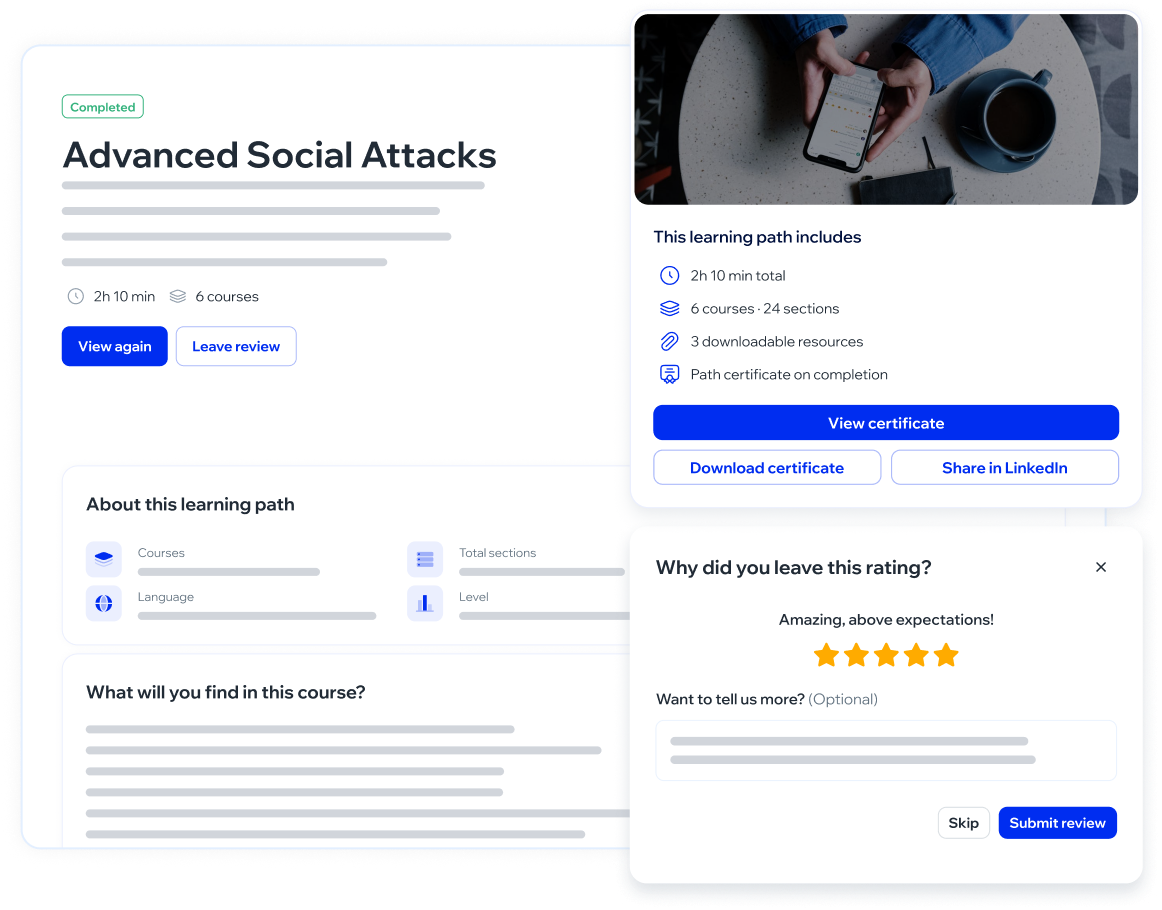
🧭 Nueva pantalla de presentación para cada Learning Path
Al entrar a un Learning Path desde tu actividad, ahora ves una pantalla previa con su título, descripción, cantidad de cursos y secciones, y el nivel — antes de empezarlo. Si ya lo empezaste, ves tu progreso y el botón para continuar donde quedaste.
🔒 Los cursos bloqueados dentro de un Learning Path explican por qué
Un curso que todavía no se desbloqueó aparece atenuado con el motivo («Completa el curso anterior para desbloquearlo» o «Todavía sin contenido»), en lugar de mostrarse sin explicación. Un curso que ya completaste sigue disponible para volver a revisarlo, incluso si el Learning Path venció.
⚡ Asignación rápida de cursos desde la grilla
Desde el menú de cada curso propio en Cursos Personalizados ahora puedes asignarlo directo a una persona, un grupo, un departamento o a toda la empresa, sin pasar por el asistente de 3 pasos.
✨ Mejoras
🎓 Awareness - Academy
🗑️ Eliminar un curso ahora explica por qué no se puede
Si intentas eliminar un curso propio que tiene gente cursando, ya no queda una ventana colgada sin respuesta: te avisa cuántas personas lo están cursando y el curso queda intacto.
🎨 Certificados rediseñados y con la identidad de tu empresa
Rediseñamos los certificados de la Academy para que se vean más claros y prolijos. Además, los certificados de los cursos propios que sube tu empresa ahora salen con tu color de marca —banda, íconos y nombre— y sin el sello de Whalemate. Los certificados de los cursos del catálogo mantienen la identidad de Whalemate.
🐛 Correcciones
🎨 Platform - UX
💬 Dos mensajes de confirmación seguidos ya se muestran los dos
Cuando una acción salía bien y otra fallaba casi al mismo tiempo, el segundo mensaje no se mostraba. Ahora se muestran los dos.
🌐 Mensaje de error traducido al conectar el correo
Al elegir Microsoft o Google como proveedor de correo sin haber conectado esa cuenta, el mensaje de error dejó de mostrar el detalle técnico interno y ahora explica la situación en español.
🚀 Campaigns
📧 Un newsletter con el remitente mal configurado ya no se da por creado
Si el remitente de correo de Microsoft o Google está mal configurado, crear un newsletter ahora te avisa al instante en lugar de darlo por enviado y fallar horas después sin que nadie se entere.
🐋 Whale Product Updates · 27.08.2026
🚀 Nuevas funcionalidades
🎓 Awareness - Academy
📖 Rediseñamos la pantalla del curso
El índice de contenidos pasó a la derecha, con el tipo y la duración de cada lección, y ahora puedes avanzar y retroceder entre lecciones —antes solo se podía avanzar—. El texto se lee de corrido, sin scroll doble, y los colores de la pantalla siguen la marca de tu empresa. Si prefieres la pantalla anterior, puedes volver a ella con un clic desde el mismo curso, sin perder tu avance. En los cuestionarios, además, ahora confirmas cada respuesta antes de pasar a la siguiente y la correcta se marca en verde.
🚀 Campaigns
📅 Fecha de corte para tus campañas de email
Las campañas de phishing por correo ahora pueden tener una fecha de corte, configurable al armar la campaña o desde el detalle de una ya enviada. Pasado ese momento el informe deja de moverse: la interacción tardía se registra pero no suma, no asigna curso ni avisa por webhook. Corregir o quitar la fecha recalcula los números.
No aplica a SMS ni QR.
🛡️ Threats
🔁 Restaurar los mensajes del botón de reporte
Ahora puedes volver cualquier mensaje del botón de reporte al texto que trae la plataforma, uno por uno y sin pasar por soporte. El mensaje restaurado sigue el idioma de tu empresa.
✨ Mejoras
🎓 Awareness - Academy
✅ Seleccionar todas las inscripciones del filtro
Al extender la fecha de vencimiento de inscripciones a un curso, ahora puedes seleccionar de una sola vez todas las que cumplen el filtro aplicado, no solo las de la página que estás viendo.
🐛 Correcciones
🚀 Campaigns
📝 El borrador de una simulación ya se puede retomar
Las simulaciones de correo que quedaron a medio hacer ahora se ven en el Calendario de lanzamientos con la etiqueta «Draft» y se pueden retomar desde el menú de la fila.
📊 Insights
📊 Las analíticas de newsletters ya no cuentan lo que sigue en camino
El detalle de una newsletter deja de contar como enviados los correos que todavía están en la cola.
🐋 Whale Product Updates · 20.08.2026
🚀 Nuevas funcionalidades
🎨 Platform - UX
🔍 Nuevo tipo de acceso: Auditor
Ya puedes darle a alguien acceso de solo lectura a toda la plataforma. Un usuario con acceso Auditor ve todo —campañas, cursos, estadísticas, configuración— y no puede modificar nada: los botones de creación no aparecen y las acciones quedan deshabilitadas con el aviso «Tu acceso es de solo lectura, así que no puedes hacer este cambio.». Se asigna desde Configuración → Usuarios, en el desplegable Tipo de acceso, y la columna Acceso de la tabla te muestra quién lo tiene.
El acceso es de solo lectura para toda la plataforma: no se puede recortar por sección. Lo único que un Auditor sí puede hacer es cambiar su propia contraseña y configurar su segundo factor. Exportar y descargar sigue funcionando: llevarse la información es parte del rol.
🎓 Awareness - Academy
🧭 El Agente arranca en una vista general del plan
Cuando tienes un plan activo, Concientización → Agente ya no te lleva directo al cronograma: abre en una vista general con el avance global del plan, los objetivos que cubre, cuánto llevas de cada tipo de actividad y cuáles son las próximas. Si todavía no hay plan, la pantalla te guía para armarlo.
Solo aparece en las empresas que ya tienen un plan del Agente activo.
📙 Curso nuevo: Desarrollo Seguro, ahora también en portugués
La versión en portugués de Desarrollo Seguro ya está en el catálogo, con el título «Desenvolvimento Seguro». Si tienes equipos que trabajan en portugués, puedes asignarles esta versión en lugar de la de español o la de inglés. Lo asignas como cualquier otro curso, desde Academia → Cursos.
✨ Mejoras
🎓 Awareness - Academy
⚡ Las inscripciones de un curso abren en empresas grandes
En Academia → Cursos → el curso → Inscripciones, la tabla ahora trae las filas por página en lugar de descargarlas todas juntas. En cursos con mucha gente inscripta, eso era la diferencia entre que la pantalla abriera y que no. Lo que cambia para ti: el total del pie de la tabla es el total real del curso y no la cantidad de filas cargadas; el buscador y los filtros de Estado, Departamento, Grupo y Rango de fechas buscan sobre todas las inscripciones del curso, así que si buscas a alguien que está en la página 8 lo encuentras desde la página 1; el orden por Empleado se mantiene al pasar de página; las exportaciones a CSV y PDF bajan todo lo que quedó filtrado; y si activas la selección de filas y cambias de página, lo que ya marcaste se mantiene.
El filtro de Rango de fechas ahora acota por la fecha de inicio de la inscripción. Antes acotaba por la de vencimiento, así que el mismo rango puede darte un resultado distinto al de antes.
📨 El histórico completo de inscripciones te llega por correo
La opción Exportar histórico completo (XLSX) dejó de hacerte esperar con la pantalla colgada. Ahora la pides, la plataforma te avisa que se está preparando, y el archivo te llega por correo con un link de descarga que dura 48 horas.
Es la exportación del histórico completo, la que trae todas las inscripciones sin filtrar por fecha. Las exportaciones a CSV y PDF de lo que estás viendo en pantalla no cambiaron: siguen descargándose en el momento.
📅 Volvió la extensión de vencimiento en lote
En Academia → Cursos → el curso → Inscripciones puedes volver a extenderle la fecha de vencimiento a varias personas de una sola vez. Arriba a la derecha hay un ícono Seleccionar filas: al presionarlo aparece una casilla en cada fila, tildas las que quieras y en la franja que aparece arriba de la tabla presionas Extender fecha de vencimiento. Puedes armar el lote recorriendo varias páginas: lo que tildaste no se pierde al cambiar de página, buscar o filtrar.
Solo se pueden seleccionar las inscripciones Pendiente o Vencida; una Completada ya cumplió su objetivo, así que su casilla está deshabilitada. Extender un lote actualiza las inscripciones que ya existen: no crea inscripciones nuevas ni deja copias. La acción de a una, desde el menú de tres puntos de cada fila, no cambió.
🐛 Correcciones
🛡️ Threats
🔗 Los enlaces de un correo reportado se analizan limpios
Los enlaces de un correo reportado llegaban con el marcado del complemento de correo pegado a la dirección, así que la consulta al servicio de reputación se hacía sobre una dirección que no era la real. Ahora se limpian antes de consultarlos y antes de guardarlos, y el veredicto que ves en Bandeja → el correo → Dominio & URLs corresponde a la dirección de verdad. Los enlaces de los que no se puede recuperar una dirección se siguen mostrando en la lista.
Aplica a los correos reportados de aquí en adelante: los reportes que ya existían conservan la dirección como se había guardado. Y limpiar la dirección no cambia el veredicto en sí — un dominio registrado ayer puede seguir dando «Limpio».
🏷️ «Eliminar al reportar» ahora se llama «Correo no deseado al reportar»
La opción decía que el correo se eliminaba, y lo que hace es moverlo a la carpeta de correo no deseado. En Configuración → Botón de Reporte la opción cambió de nombre y suma un aviso que explica qué hace exactamente.
Es un cambio de nombre: el comportamiento del botón de reporte no cambió. El movimiento a correo no deseado funciona en cuentas Microsoft (Outlook / Microsoft 365).
📊 Insights
🗂️ Exportar a PDF un tablero muy largo ya no falla
Exportar el tablero de una empresa con muchos departamentos cortaba la descarga. Ahora el archivo se genera igual.
🎨 Platform - UX
🇧🇷 La plantilla de nómina acepta el portugués
La plantilla que descargas desde Colaboradores → Importar → Cargar manualmente ofrecía un código de idioma que la importación después rechazaba, así que las filas en portugués no entraban. Ya está corregido en la plantilla.
Si tienes una plantilla descargada de antes, vuelve a descargarla: la vieja sigue trayendo el código que no sirve.
🧩 La vista previa de un grupo inteligente ya no repite personas
La vista previa de un grupo inteligente mostraba a la misma persona varias veces, y el contador indicaba el tamaño de la muestra en lugar de a cuántas personas alcanza el grupo. Las dos cosas están corregidas.
La membresía del grupo nunca estuvo mal: lo que fallaba era lo que mostraba la vista previa.